Express 2026: Microkernel Architecture
Loading...
Loading...

If you’ve built a couple of Express apps already, you know how quickly the whole thing can get messy. At the beginning everything looks neat, your app.js or server.js feels small, simple and kind of perfect. Then you start adding routes, a few middlewares, maybe some validation, a controller here and there, and suddenly the file isn’t so cute anymore.
This is usually the point where “just getting it to work” stops being enough, and architectural decisions start to matter. We’ve seen this pattern repeatedly while teaching real Express apps at JSMastery, where projects that start clean can slowly turn fragile without a clear structure in place.
import express from 'express';import userRoutes from './routes/user.routes.js';import productRoutes from './routes/product.routes.js';const app = express();app.use(express.json());app.use('/users', userRoutes);app.use('/products', productRoutes);app.listen(3000, () => console.log('Server running on port 3000'));
At this stage, everything still looks fine. The problem shows up later, when the application grows.
As new features are added, a few patterns start to emerge:
Over time, this creates real friction. Adding a new API version means carefully untangling shared middleware. Disabling or replacing a feature affects unrelated parts of the app. Understanding request flow requires scanning multiple files just to figure out what runs, and when.
The good news is this is not an Express limitation, it’s an architectural one. In this lesson, you’ll learn how to structure an Express application using a microkernel style approach, where features are isolated, composable, and registered explicitly, without turning app.js into a growing dependency hub.
When structuring a backend application, there isn’t a single “correct” architecture. You’ll commonly see patterns like layered architecture, modular monoliths, or even service oriented approaches depending on the size and goals of the system. Express itself doesn’t enforce any of these, which is both its strength and the reason many projects slowly drift into unstructured codebases.
For this lesson, we’ll focus on the microkernel architecture, a pattern that works especially well for growing Express applications that need clear boundaries without the overhead of microservices.
At a high level, a microkernel separates the application into two parts:
You can think of the core as the engine of a car. The engine doesn’t handle navigation, entertainment, or safety features directly. It provides the essential mechanics, while separate components plug in to handle specific responsibilities.
In an Express app, the core is your main server setup. Each feature, users, products, payments, or anything else, becomes its own module that registers routes, middleware, and dependencies with that core.
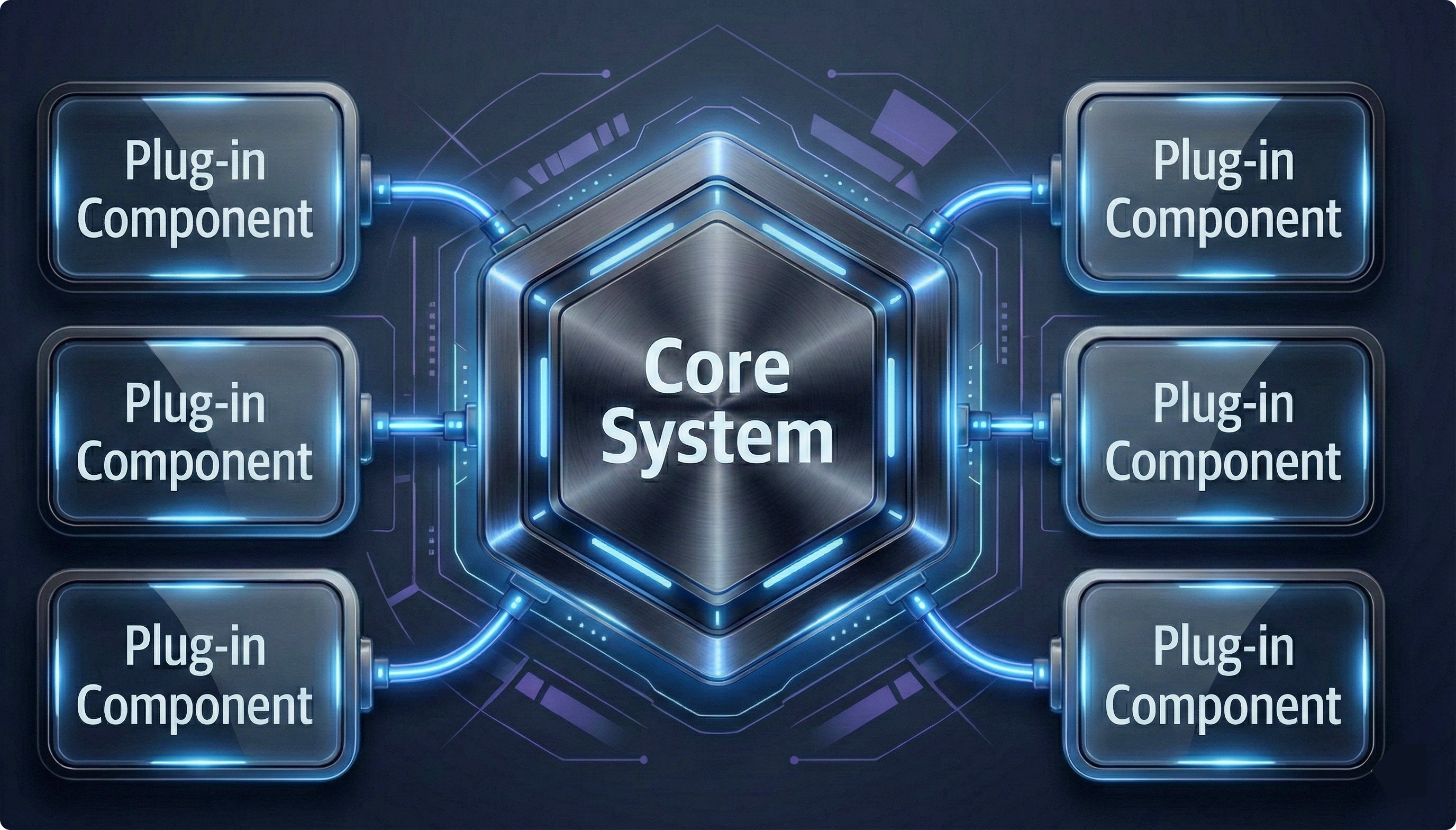
This approach brings a few practical benefits that matter in real projects:
Instead of a single app.js file growing over time, the application becomes a lightweight host that loads and wires feature modules together. Each module knows only about the core contract, not about other features.
That’s the microkernel mindset. In the next section, we’ll translate this idea into a practical Express folder structure and see how these modules are actually wired into the core.
Now that we understand the microkernel concept, it’s time to organize our Express app so features can be added without constantly modifying the core. The goal is straightforward: each feature owns its internal logic, and the main application is responsible only for loading and wiring those features together. Before diving into the folder structure, it’s worth clearing up a common misconception. At first glance, this approach can look similar to microservices. The key difference is scope and deployment. In a microkernel Express app, all modules live in the same codebase and run in the same process. They share infrastructure like the HTTP server, database connection, and configuration. What you gain is modularity and isolation, without the operational complexity of separate services. With that in mind, a practical microkernel-style folder structure might look like this:
/src├─ /core│ ├─ app.js // new Express() + base config│ ├─ server.js // http.createServer, graceful shutdown│ ├─ kernel.js // NEW: loads and registers all modules│ └─ config/ // environment, defaults, validation (zod)│├─ /modules // All feature modules (plugins)│ ├─ /users│ │ ├─ user.module.js // register function + dependencies│ │ ├─ user.routes.js│ │ ├─ user.controller.js│ │ ├─ user.service.js│ │ └─ user.model.js│ ├─ /products│ │ └─ ... same pattern│ └─ /orders, /payments, etc.│├─ /plugins // Optional: reusable across projects│ └─ /monitoring│ └─ monitoring.module.js│├─ /common│ ├─ middlewares/│ │ ├─ auth.middleware.js│ │ ├─ error.middleware.js│ │ └─ validation.middleware.js│ ├─ utils/│ │ └─ logger.js│ └─ errors/│ └─ AppError.js│└─ index.js // bootstrap: require('./core/kernel')
Here’s the idea behind each part:
With this structure, adding a new feature is effortless: just drop a folder under /modules with its own routes, controllers, and services. The core doesn’t need a single change; you just plug it in.
But how do we make the core recognize and attach new modules automatically? That’s where we will implement a kernel inside our Express app. Next, we’ll see how to dynamically load all modules so your app becomes truly plug-and-play.
In this step, we make the core aware of all modules without manually importing them. That’s exactly what the kernel does, it discovers, registers, and attaches each module to the app automatically.
Here’s a simplified example in core/kernel.js:
import fs from 'fs';import path from 'path';import express from 'express';import { fileURLToPath } from 'url';import { applyCommonMiddlewares } from '../common/middlewares/index.js';const __filename = fileURLToPath(import.meta.url);const __dirname = path.dirname(__filename);class Kernel {constructor() {this.app = express();this.modules = [];this.services = {};}async boot() {applyCommonMiddlewares(this.app);const modulesPath = path.join(__dirname, '../modules');const moduleFolders = fs.readdirSync(modulesPath);for (const folder of moduleFolders) {const modulePath = path.join(modulesPath, folder, `${folder}.module.js`);if (fs.existsSync(modulePath)) {const module = await import(modulePath);if (typeof module.register === 'function') {await module.register(this.app, { services: this.services });this.modules.push(module.name || folder);console.log(`✓ Module loaded: ${folder}`);}}}return this.app;}}export default new Kernel();
How it works:
Global middleware is applied first so all modules inherit it automatically. Example from /common/middlewares/applyCommonMiddlewares.js:
import cors from 'cors';import compression from 'compression';import express from 'express';import morgan from 'morgan';import cookieParser from 'cookie-parser';import helmet from 'helmet';import rateLimit from 'express-rate-limit';import { errorHandler } from './error.middleware.js';import logger from '../utils/logger.js';const limiter = rateLimit({windowMs: 15 * 60 * 1000,limit: 1000,standardHeaders: 'draft-7',legacyHeaders: false,message: { error: 'Too many requests, please try again later.' },});export function applyCommonMiddlewares(app) {app.use(helmet());app.use(cors({origin: process.env.ALLOWED_ORIGINS?.split(',') || '*',credentials: true,}),);app.use(compression());app.use(express.json({ limit: '10mb' }));app.use(express.urlencoded({ extended: true, limit: '10mb' }));app.use(cookieParser());app.use(morgan('combined', { stream: logger.stream }));app.use(limiter);app.use(errorHandler);return app;}
The kernel reads the /modules folder and looks for each module’s xx.module.js file.
Each module implements a register function that hooks its routes and optional middleware into the app.
Adding a new module? Just drop it in, the kernel finds it and attaches it automatically.
Now, your core app is completely decoupled from individual features. You don’t touch app.js or server.js every time you add a module, the kernel handles it all, making your app truly plug-and-play.
Since the kernel automatically loads all xx.module.js files, you might be wondering: what does a module actually look like? Let’s dive into a module folder next.
Each module is self-contained: it has its own routes, controllers, services, models, and a register function that tells the kernel how to attach it to the app.
Here’s how a Users module could look:
// modules/users/user.module.jsimport { Router } from 'express';import userRoutes from './user.routes.js';import { authMiddleware } from '../../common/middlewares/auth.middleware.js';export const name = 'users';export const version = '1.0.0';// Optional dependencies injected by kernelexport const requires = ['database', 'mailer'];export async function register(app, { services } = {}) {const router = Router();// Module-specific middlewarerouter.use(authMiddleware);// Attach module routes under /usersrouter.use('/users', userRoutes);// Optionally prefix all module routesapp.use('/api/v1', router);console.log('✓ Users module registered');}
And a quick look at the routes:
// modules/users/user.routes.jsimport { Router } from 'express';import { getUsers, createUser } from './user.controller.js';const router = Router();router.get('/', getUsers);router.post('/create', createUser);export default router;
Why this works so well:
Adding a new module is now effortless: create a folder, implement a module.js with a register function, drop in routes, controllers, and services and the kernel does the rest.
Thanks to the kernel, your main server file becomes simple and readable:
import http from 'http';import kernel from './core/kernel.js';async function startServer() {const app = await kernel.boot();const server = http.createServer(app);server.listen(3000, () => {console.log('Server running on port 3000');});// Graceful shutdownprocess.on('SIGTERM', () => server.close(() => process.exit(0)));}startServer().catch((err) => {console.error('Failed to start server:', err);process.exit(1);});
Notice how clean this is: no long list of routes or middleware imports. The kernel handles everything dynamically, so your bootstrap file stays focused on starting the server and managing lifecycle events.
By now, you’ve seen the kernel in action, modules plugging in automatically, and your server bootstrap staying clean. But why should this matter for your real-world Express apps? Let’s break it down:
Your app just got a clean engine, the kernel and your modules plug in automatically. Here’s why it’s a game-changer:
Moving your Express app to a microkernel architecture isn’t just a nice-to-have, it’s a way to stay organized, scalable, and future-proof. Start small: pick a feature, create a module, drop it in, and watch the kernel handle the rest. Once you see it in action, building and scaling your Express apps becomes almost effortless, the same approach we focus on when structuring real-world Express applications at JSMastery.

Join JS Mastery Pro to apply what you learned today through real-world builds, weekly challenges, and a community of developers working toward the same goal.