Prisma Crash Course for Beginners
Loading...
Loading...

Let’s be real: writing raw SQL strings in 2026 feels like fixing a Tesla with a hammer. It’s error-prone, there’s zero autocomplete, and one typo sends your whole app crashing.
Even traditional ORMs can feel bloated and "heavy." Enter Prisma. Prisma isn't just another ORM; it's a productivity superpower. It turns your database into a fully typed TypeScript object, giving you auto-completion for your data before you even finish typing the query.
In this guide, we’re going to stop talking and start building. Let's see why Prisma is the #1 choice for modern Full-Stack developers.
If you want to go beyond the basics and master the entire database ecosystem, from writing complex SQL queries to mastering Prisma’s advanced features, check out our full Database Mastery Course: SQL to Prisma.
Prisma is an open-source ORM (Object Relational Mapper) for Node.js and TypeScript. In plain English: it’s a tool that helps you talk to your database without writing endless SQL or Raw SQL.
Instead of:
SELECT * FROM users WHERE id = 1;
You can write:
const user = await prisma.user.findUnique({where: { id: 1 },});
Clean, right? And here is the best part: while we are focusing on PostgreSQL in this guide, Prisma is a master of disguise. It works seamlessly with MySQL, SQLite, SQL Server, CockroachDB, and even MongoDB. Whether you’re a relational pro or a NoSQL fan, Prisma has your back.
Let’s stop talking and start shipping. Here is how you get Prisma running in a modern PostgreSQL environment.
If you don’t already have a project, let’s start by creating one from scratch.
If you already have an existing backend project, you can safely skip this step and jump straight to Step 2.
First, create a new folder and move into it:
mkdir hello-prisma && cd hello-prisma
Now initialize a Node.js project:
npm init -y
Next, we’ll set up TypeScript. Prisma works beautifully with TypeScript, and this will give us type safety from day one.
npm install typescript tsx @types/node --save-devnpx tsc --init
At this point, you have a basic Node.js + TypeScript project ready. Nothing fancy yet, just a clean foundation we can build on.
Now let’s install the packages we actually need for Prisma and PostgreSQL. Run these commands inside your backend or server folder, basically wherever your API logic lives.
We’re going to install two groups of packages:
npm install prisma @types/node @types/pg --save-devnpm install @prisma/client @prisma/adapter-pg pg dotenv
Let’s quickly understand what each of these packages does, because knowing this makes Prisma feel a lot less magical and a lot more logical.
Once these are installed, your project is fully prepared to start working with Prisma. Next, we’ll initialize Prisma and start modeling our database in a clean, type safe way.
Prisma works best with ES Modules, so before moving forward, let’s make sure your project is set up correctly.
If you haven’t configured this yet, open your tsconfig.json and update it to look like this:
{"compilerOptions": {"module": "ESNext","moduleResolution": "node","target": "ES2023","strict": true,"esModuleInterop": true,"ignoreDeprecations": "6.0"}}
Here’s what matters for now:
Next, open your package.json and modify the type, it might be set to commonjs .
{"type": "module",}
Alright, now you are ready to initialize the Prisma ORM.
Now let’s initialize Prisma. Run the following command:
npx prisma init
This command is a heavy lifter. It creates:
The generated prisma.config.ts file will look something like this:
import { defineConfig, env } from 'prisma/config';export default defineConfig({schema: 'prisma/schema.prisma',migrations: {path: 'prisma/migrations',},datasource: {url: env('DATABASE_URL'),},});
You usually won’t need to touch this file right away, but it’s good to know where Prisma gets its configuration from.
Inside prisma/schema.prisma, you’ll also see that Prisma uses an ESM first client generator with a custom output path:
generator client {provider = "prisma-client"output = "../generated/prisma"}datasource db {provider = "postgresql"}
This tells Prisma where to generate the Prisma Client and which database provider you’re using.
By default, Prisma may configure a cloud hosted PostgreSQL database for you.
If you want to use your own local or remote PostgreSQL database, simply open the .env file and update the connection string:
//DATABASE_URL = 'postgresql://username:password@localhost:5432/mydb?schema=public';
Replace the placeholders with your actual database credentials:
Once this is set, Prisma knows exactly how to connect to your database. Next up, we’ll start defining models inside schema.prisma and turn this empty setup into a real database.
This is where Prisma really starts to feel fun. Instead of writing raw SQL to create tables, you describe your data using models, which feel a lot like plain JavaScript objects.
Open prisma/schema.prisma and add the following models:
generator client {provider = "prisma-client"output = "../generated/prisma"}datasource db {provider = "postgresql"}model User {id Int @id @default(autoincrement())email String @uniquename String?posts Post[]}model Post {id Int @id @default(autoincrement())title Stringcontent String?published Boolean @default(false)author User @relation(fields: [authorId], references: [id])authorId Int}
Here we define two tables: User and Post, with a one-to-many relationship.
Think of it like a real-world scenario: one author can write multiple blog posts, but each post has only one author. Prisma lets you model this clearly, without writing raw SQL or manually managing foreign keys.
This is your foundation, connecting tables in a way that feels like working with objects in JavaScript, while Prisma handles all the database logic under the hood.
Now the migration part. A migration is basically Prisma’s way of saying your database:
“Here’s the structure I want you to have.”
It takes the models you wrote in schema.prisma and creates the actual tables and columns in your database. Think of it like turning an architectural design into a real building.
To apply your schema, run:
npx prisma migrate dev --name init
This command does a few things:
Once it finishes, your database is officially live with the structure you defined. Later, we’ll explore Prisma Studio to visually inspect these tables.
Now that your database structure exists, we need a way to talk to it from our code. The best practice is to create one shared Prisma Client instance and reuse it across your app.
Create a file at lib/prisma.ts:
import { PrismaPg } from '@prisma/adapter-pg';import { PrismaClient } from '../generated/prisma/client';const connectionString = `${process.env.DATABASE_URL}`;const adapter = new PrismaPg({ connectionString });const prisma = new PrismaClient({ adapter });export { prisma };
Here’s what’s happening:
From now on, whenever you need to read or write data, you’ll import this prisma object and use it to query your database.
And that’s it.
You now have Prisma fully set up, your database modeled, migrated, and connected to your application. Next, we can start writing real queries and see how Prisma feels in everyday use.
Now it’s time to actually use Prisma and verify that everything is working correctly. To test your setup, create a file in your project root called script.ts and add the following code:
async function main() {// Create a new user with a postconst user = await prisma.user.create({data: {name: 'Alice',email: 'alice@prisma.io',posts: {create: {title: 'Hello World',content: 'This is my first post!',published: true,},},},include: {posts: true,},});console.log('Created user:', user);// Fetch all users with their postsconst allUsers = await prisma.user.findMany({include: {posts: true,},});console.log('All users:', JSON.stringify(allUsers, null, 2));}main().then(async () => {await prisma.$disconnect();}).catch(async (e) => {console.error(e);await prisma.$disconnect();process.exit(1);});
Let’s quickly understand what’s happening here.
Notice how readable this feels. No SQL queries, no joins, just plain JavaScript objects.
After saving the file, run the script:
npx tsx script.ts
If everything is set up correctly, you should see output similar to this in your terminal:
Created user: {id: 1,email: 'alice@prisma.io',name: 'Alice',posts: [{id: 1,title: 'Hello World',content: 'This is my first post!',published: true,authorId: 1}]}All users: [{"id": 1,"email": "alice@prisma.io","name": "Alice","posts": [{"id": 1,"title": "Hello World","content": "This is my first post!","published": true,"authorId": 1}]}]
At this point, Prisma is fully working. Your database is connected, data is being written, and queries are returning exactly what you expect.
If you prefer a visual way to inspect your data, Prisma gives you a built in UI called Prisma Studio.
Run:
npx prisma studio
This opens a browser based interface where you can view, edit, and explore your database tables without writing any queries. It’s especially useful when you’re learning or debugging.
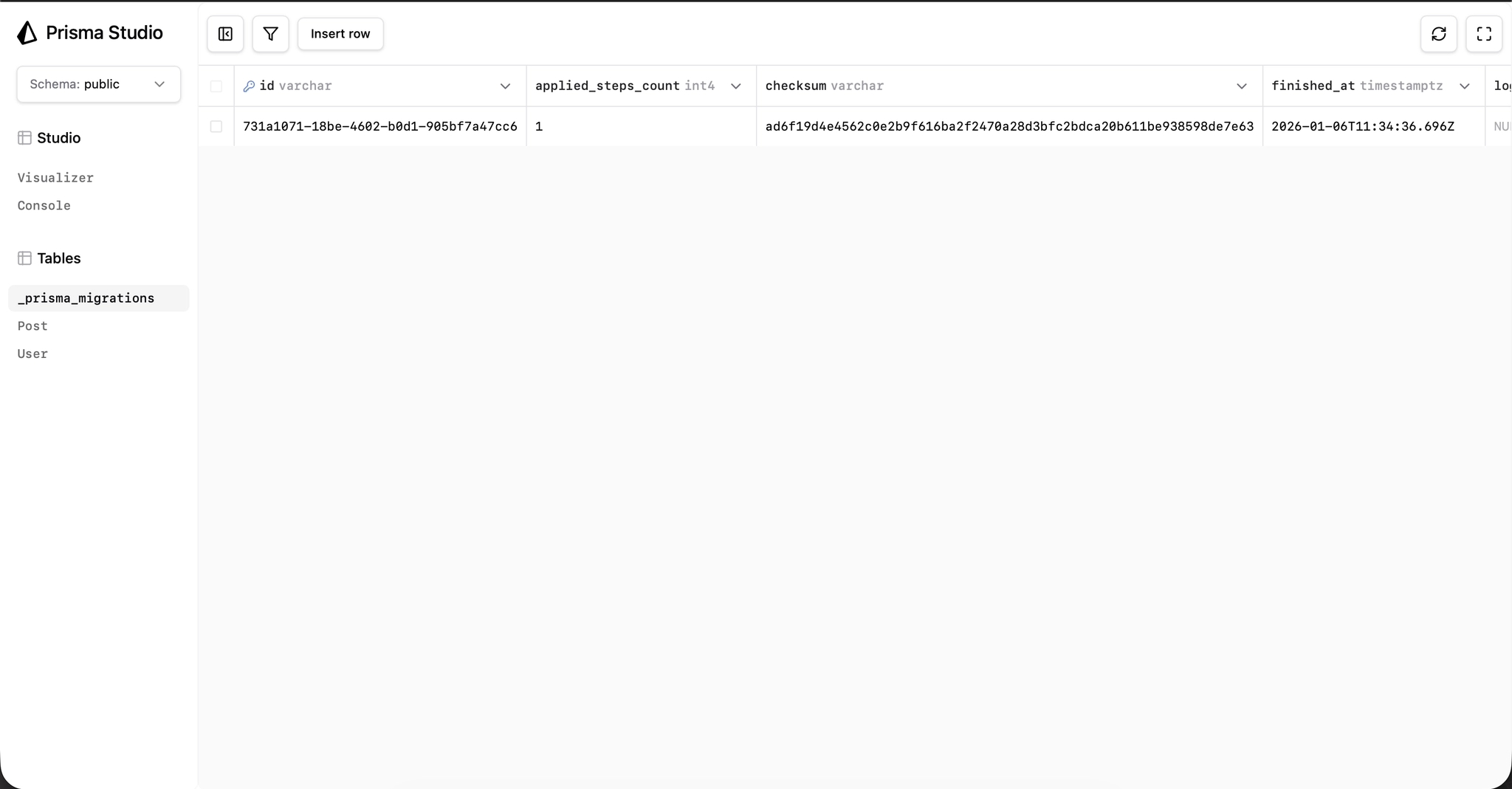
Alright, now let’s check some common questions about Prisma that will help you to decide when you should use Prisma in your project.
Depends. For complex queries, SQL still shines. But for everyday CRUD, Prisma saves you tons of time.
Absolutely. Prisma isn’t tied to a single stack. Whether you’re working with Next.js, Remix, NestJS, or even a classic Express backend, Prisma plugs right in.
You define your models once in the Prisma schema, and then you can safely query your database inside your framework’s API routes, server components, or backend logic. That’s why so many devs love it - it’s framework-agnostic but fits seamlessly into modern app architectures.
Well, no and yes.
In short: Prisma ORM works with almost any database, but if you’d rather not deal with hosting one yourself, Prisma now offers that as part of their services.
That’s the basics! You just went through a Prisma crash course - from installing it, to defining schemas, running migrations, and writing queries.
If you’re building a new project, Prisma is absolutely worth trying. It’s beginner-friendly, plays nicely with modern frameworks, and will save you hours of debugging.
👉 Want to dive deeper into development? Check out our course and level up your database skills: Database Mastery Course: SQL to Prisma

Join JS Mastery Pro to apply what you learned today through real-world builds, weekly challenges, and a community of developers working toward the same goal.