Top 7 Mistakes Developers Make When Scaling ExpressJS Apps
Loading...
Loading...

Scaling an ExpressJS app isn’t just about throwing more servers at it. In fact, adding more instances or spinning up a bigger cloud machine won’t fix the underlying issues if your code and architecture aren’t ready for growth.
From small startups to mid-sized apps, I’ve seen developers make the same mistakes over and over, and most of them only become obvious when users start complaining about slow responses or random errors.
In this post, we’ll go through the top 7 mistakes that actually hurt scaling and, more importantly, how to avoid them.
If you are serious about building scalable systems and want a structured path to mastery, check out the Ultimate Backend Course. Join the waitlist to get notified when we launch!
ExpressJS runs on a single-threaded event loop. That’s amazing for I/O-heavy tasks, but dangerous when CPU-heavy or synchronous code sneaks in.
A classic example:
// ❌ Blocking the event loopconst hashed = bcrypt.hashSync('password', 12);res.send({ hashed });
If this route gets hit multiple times simultaneously, every request waits for the previous one to finish. Suddenly, your “fast API” feels like a snail.
The fix? Always use asynchronous methods:
// ✅ Non-blockingconst hashed = await bcrypt.hash('password', 12);res.send({ hashed });
Pro tip: For heavy computation, use worker threads or offload tasks to microservices. Combine with PM2 or Node clustering to fully utilize multi-core CPUs.
Think of the event loop like a single-lane bridge: if a truck blocks it, all cars behind it wait.
When you first build an Express app, it’s easy to think, “One server should be enough.” After all, Node’s single-threaded event loop is pretty fast, right? And for small apps, it is. But the moment your app starts seeing real traffic, that single process can become a bottleneck without you even noticing.
Here’s the problem: a single Node process can only use one CPU core. That means if your server has 8 cores, 7 of them are sitting idle while one core is doing all the work. Requests start piling up, response times increase, and users notice. You might even see crashes if traffic spikes.
So how do we fix this? The two concepts you need to understand are clustering and load balancing and trust me, once you get these, scaling your app feels way less scary.
Clustering is Node’s way of letting you run multiple processes on the same machine, one per CPU core. Think of it like having multiple chefs in a kitchen instead of just one. Each chef can cook independently, so orders get out faster, and if one chef burns the sauce, the others keep cooking.
Node even gives us a simple way to do this:
const cluster = require('cluster');const os = require('os');const express = require('express');if (cluster.isMaster) {const cpuCount = os.cpus().length;console.log(`Master process spawning ${cpuCount} workers...`);for (let i = 0; i < cpuCount; i++) cluster.fork();cluster.on('exit', (worker) => {console.log(`Worker ${worker.process.pid} died. Spawning a new one.`);cluster.fork();});} else {const app = express();app.get('/', (req, res) => res.send(`Hello from worker ${process.pid}`));app.listen(3000, () => console.log(`Worker ${process.pid} listening`));}
Here’s,
Now, instead of one process handling all requests, you have one process per CPU core. And if a worker crashes, the master can automatically restart it.
If you want to dive deeper into Node.js clustering, check out the official Node cluster docs.
Clustering solves the “single server” problem on one machine, but what if your app grows bigger? Maybe you’re running multiple servers or containers. This is where load balancing come into the game.
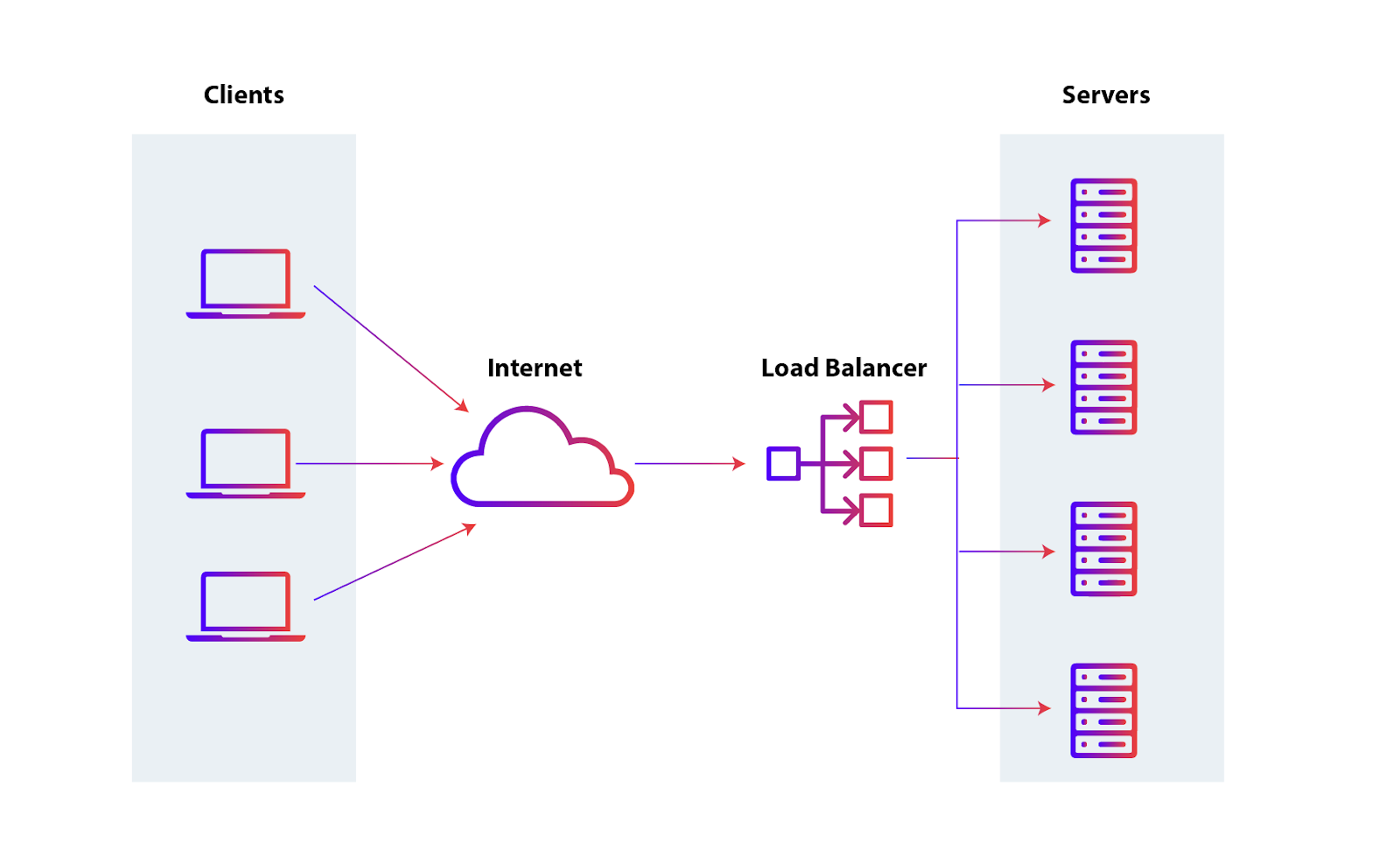
https://www.appviewx.com/education-center/load-balancer-and-types
A load balancer distributes incoming traffic across multiple servers so no single instance gets overwhelmed. Picture a receptionist at a busy office: they direct clients to whichever desk is free, keeping the flow smooth. In the web world, tools like NGINX, AWS ELB, or HAProxy act as that receptionist.
So here’s the key: clustering and load balancing go hand in hand.
Combine the two, and your app can handle much more traffic, with fewer bottlenecks and better reliability.
But when it comes to using cluster and load balancer to split the load to multiple server, there’s also some important thing that you should aware of. You will know one mistake in the next step.
When your Express app is small, it’s tempting to keep things simple. You might use the default in-memory session store, or store some user state directly in memory. It works fine… until it doesn’t.
Here’s the problem, in-memory storage is tied to a single server process. If your app ever runs on multiple servers, or even multiple Node workers in a cluster, users can start seeing weird behavior:
Basically, the state doesn’t move with the user. One server doesn’t know what the other server has in memory.
Think of each server like a separate notebook. Each notebook keeps track of its own users’ sessions. If a user switches to a different notebook, that server has no memory of them. That’s exactly what happens when you scale an app without using a shared session store.
To fix this, move your session storage outside of the Node process. Use an external, centralized store that all servers can access:
This makes your app stateless, meaning any server or worker can handle any request, and users won’t notice the backend juggling multiple processes.
Quick Example Using Redis:
const session = require('express-session');const RedisStore = require('connect-redis')(session);const redis = require('redis');const redisClient = redis.createClient();app.use(session({store: new RedisStore({ client: redisClient }),secret: 'keyboard cat',resave: false,saveUninitialized: false,}),);app.get('/', (req, res) => {req.session.views = (req.session.views || 0) + 1;res.send(`You visited this page ${req.session.views} times`);});
What’s happening here:
Even if your app isn’t running on multiple servers today, adopting an external session store early saves you headaches later. When traffic grows, you won’t need to rewrite your authentication or session logic from scratch.
Many large-scale apps, even with tiny APIs, rely on Redis for sessions and caching. It’s fast, simple, and makes scaling much smoother.
Many Node apps crash because errors aren’t handled consistently. Uncaught exceptions or unhandled promise rejections can take down your server, and inconsistent logging makes debugging harder.
The fix: use centralized error middleware and structured logging. For example:
app.use((err, req, res, next) => {console.error(err);res.status(500).json({ error: 'Something went wrong!' });});
For production, consider Winston, Pino, or Bunyan for structured logs, and tools like Sentry for monitoring.
Centralized handling + proper logging = fewer crashes, faster debugging, better reliability.
This is just a simple example of centralize error handling if you want to learn more about error handling and handle error like a pro, then check out this blog post: Error Handling in Express Without try/catch Hell
Clustering, load balancing, handling sessions in memory, and proper error handling all help when scaling an Express application. But caching is one of the simplest ways to significantly improve performance.
Every request hitting the database adds load and slows your app, especially when the data doesn’t change frequently. A common mistake is querying the database on every request, even for static or semi-static data.
This is where caching helps balance load for expensive APIs. By storing frequently requested data temporarily, you can reduce server load and speed up responses. Some common caching options are:
You can also use HTTP caching headers like Cache-Control or ETag for API responses, which lets clients avoid unnecessary requests.
For example:
app.get('/products', async (req, res) => {const products = await getProducts();// Tell the client to cache this response for 60 secondsres.set('Cache-Control', 'public, max-age=60');res.json(products);});
The trick is balancing cache freshness vs. consistency: cache too long, and users may see stale data; cache too short, and you lose performance benefits. A good starting point is caching data that doesn’t change every second, like dashboards, product lists, or public stats.
For more complex or multi-server setups, using a central store like Redis is the recommended approach.
Let’s say, you have an endpoint that fetches expensive or frequently requested data, Redis is a safe and common choice for caching.
const express = require('express');const redis = require('redis');const { getExpensiveStats } = require('./services');const app = express();const redisClient = redis.createClient();app.get('/stats', async (req, res) => {try {// Try to get cached dataconst cached = await redisClient.get('stats');if (cached) {return res.json(JSON.parse(cached));}// If not cached, fetch dataconst stats = await getExpensiveStats();// Store in cache for 60 secondsawait redisClient.setEx('stats', 60, JSON.stringify(stats));res.json(stats);} catch (err) {console.error(err);res.status(500).json({ error: 'Something went wrong' });}});
Here’s what’s happening in this code:
You can tweak the cache time based on how often your data changes for that endpoint.
This is just a simple example how you can use Redis for caching. If you want to learn more about Redis setup in express application and using Redis for cache, you can check this blog: https://redis.io/tutorials/develop/node/nodecrashcourse/caching/
Caching can reduce database load, but it can’t fix inefficient queries. Even with caching, poorly designed queries will slow your app under real traffic.
A common issue is the N+1 problem, where your code makes one query to fetch a list, then additional queries for each item, creating unnecessary database load.
Example with Prisma:
// N+1 problem: fetching posts and then users individuallyconst posts = await prisma.post.findMany();for (const post of posts) {post.user = await prisma.user.findUnique({ where: { id: post.userId } });}res.json(posts);
If you have 100 posts, this runs 101 queries: 1 for posts + 100 for users.
Optimized version:
// Fetch posts with related users in one queryconst posts = await prisma.post.findMany({include: { user: true },});res.json(posts);
Now all the data is fetched in a single query, reducing load and improving response time.
Other tips for database performance:
Small query optimizations, combined with caching and clustering, can have a huge impact on overall app performance.
You can implement caching, optimize queries, and use clustering, but if you never test your app under real traffic, you won’t know its limits. Many developers deploy without checking how their app performs when hundreds or thousands of users hit it simultaneously.
How to test effectively:
Load testing isn’t a one-time thing. Your app changes over time, so make it part of your routine monitoring.
Example with Artillery (quick start):
config:target: "http://localhost:3000"phases:- duration: 60arrivalRate: 50scenarios:- flow:- get:url: "/stats"
By combining load testing with monitoring, you can confidently scale your Express app instead of guessing.
Scaling an Express app isn’t just about adding more servers. It’s about thinking ahead, writing efficient code, and using the right tools. From clustering and caching to optimized queries and proper load testing, each step helps your app handle more users without breaking a sweat. **
To master these patterns, join the Ultimate Backend Course.
Start small: implement caching where it makes sense, watch out for N+1 queries, handle errors consistently, and always test your app under realistic traffic. These simple habits go a long way in keeping your app fast, reliable, and ready to grow.
Remember: performance isn’t a one-time fix, it’s a habit. Keep monitoring, testing, and optimizing, and your Express apps will scale gracefully as your traffic grows.
Build for growth, but monitor for bottlenecks. Your future self (and your users) will thank you.

Join JS Mastery Pro to apply what you learned today through real-world builds, weekly challenges, and a community of developers working toward the same goal.